
Capturing wireless traffic in a Windows environment is unfortunately not as easy as a setting
change. As with most Windows-based software, drivers in Windows are often not open source and do not allow for configuration change into monitor mode. With this in mind, we must use a specialized piece of hardware known as an AirPcap device.
Once you have obtained an AirPcap device you will be required to install the software on the accompanying CD to your analysis computer.
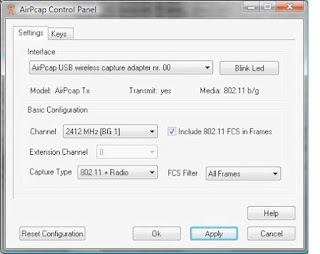
The configurable options include:
• Interface - Select the device you are using for your capture here. Some advanced analysis scenarios may require you to use more than one AirPcap device to sniff simultaneously on multiple channels.
• Blink LED - Clicking this button will make the LED lights on the AirPcap device blink.
This is primarily used to identify the specific adapter you are using if you are using multiple
AirPcap devices.
• Channel - In this field, you select the channel you want AirPcap to listen on.
Extension Channel - This option is only available on 802.11n capable AirPcap devices (AirPcap nX) and allows you to select an extension channel.
• Capture Type - The options are 802.11 Only, 802.11+Radio, and 802.11+PPI. The 802.11 Only option includes the standard
Include 802.11 FCS in Frames - By default, systems strip the last four checksum
bits from wireless packets.
• FCS Filter - This option will allow you to filter out packets based upon whether they have a
valid or invalid FCS.
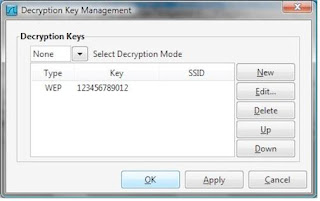
AirPcap supports decryption of wireless traffic in two modes. Driver mode, configurable from
the AirPcap Control Panel, only supports WEP.
It is recommend that decryption keys be configured using Wireshark mode, which supports WEP, WPA, and WPA2, and is managed from the wireless toolbar inside of Wireshark.
You can enable this toolbar when you have an AirPcap adapter plugged into your analysis computer by opening Wireshark, going to the View dropdown menu, and placing a checkmark next to the Wireless Toolbar option.
 You will need to set the Decryption Mode drop-down box to Wireshark, and add your appropriate encryption key by clicking the Decryption Keys button, clicking New, selecting the key type, and entering the key itself.
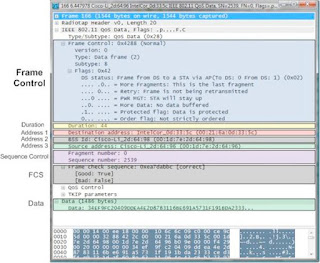
Analyzing Wireshark dissection of the 802.11 header:
We can immediately determine this by looking at the Type listing under the Frame Control section of the packet.
change. As with most Windows-based software, drivers in Windows are often not open source and do not allow for configuration change into monitor mode. With this in mind, we must use a specialized piece of hardware known as an AirPcap device.
Once you have obtained an AirPcap device you will be required to install the software on the accompanying CD to your analysis computer.

The configurable options include:
• Interface - Select the device you are using for your capture here. Some advanced analysis scenarios may require you to use more than one AirPcap device to sniff simultaneously on multiple channels.
• Blink LED - Clicking this button will make the LED lights on the AirPcap device blink.
This is primarily used to identify the specific adapter you are using if you are using multiple
AirPcap devices.
• Channel - In this field, you select the channel you want AirPcap to listen on.
Extension Channel - This option is only available on 802.11n capable AirPcap devices (AirPcap nX) and allows you to select an extension channel.
• Capture Type - The options are 802.11 Only, 802.11+Radio, and 802.11+PPI. The 802.11 Only option includes the standard
Include 802.11 FCS in Frames - By default, systems strip the last four checksum
bits from wireless packets.
• FCS Filter - This option will allow you to filter out packets based upon whether they have a
valid or invalid FCS.
AirPcap supports decryption of wireless traffic in two modes. Driver mode, configurable from
the AirPcap Control Panel, only supports WEP.
It is recommend that decryption keys be configured using Wireshark mode, which supports WEP, WPA, and WPA2, and is managed from the wireless toolbar inside of Wireshark.
You can enable this toolbar when you have an AirPcap adapter plugged into your analysis computer by opening Wireshark, going to the View dropdown menu, and placing a checkmark next to the Wireless Toolbar option.
 You will need to set the Decryption Mode drop-down box to Wireshark, and add your appropriate encryption key by clicking the Decryption Keys button, clicking New, selecting the key type, and entering the key itself.
Analyzing Wireshark dissection of the 802.11 header:
We can immediately determine this by looking at the Type listing under the Frame Control section of the packet.

Comments
zoomzatag
best regards,
zomzzz
zoomzatag@gmail.com
best regards,
zomzzz
Can you give me an estiaate of the airpcap usb, Also if any contact person name in India would be helpful from whom I can talk about the same.
Can you please let me know about the cost of airpcap device and where I can get in Blore?
Regards,