
Insecure configuration: Debug and Backup enabled in Android apps

It's a very trivial mistake a lot of developers do. They don't pay much attention to this simple looking misconfigurations which can be a big risk to apps. Generally they put much attention on other best practices such as intents, permissions etc, but tend to ignore the debuggable and allowbackup settings. I came across various such mistakes.
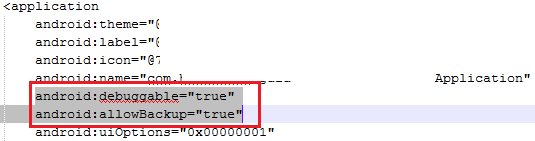


The app is debuggable, which means we can attach a debugger to the process and step through every single instruction and even execute arbitrary code in the context of app process.
Similarly, allowbackup is used to determine if to allow the application to participate in the backup and restore infrastructure. This leads to potential data leakage.

If not required, harden the configuration file by setting the values= “False”

Reference: developer.android.com/guide/topics/manifest/application-element.html

Comments

Popular posts from this blog

Using an AirPcap device in Windows with Wireshark

Capturing wireless traffic in a Windows environment is unfortunately not as easy as a setting change. As with most Windows-based software, drivers in Windows are often not open source and do not allow for configuration change into monitor mode. With this in mind, we must use a specialized piece of hardware known as an AirPcap device. Once you have obtained an AirPcap device you will be required to install the software on the accompanying CD to your analysis computer. The configurable options include: • Interface - Select the device you are using for your capture here. Some advanced analysis scenarios may require you to use more than one AirPcap device to sniff simultaneously on multiple channels. • Blink LED - Clicking this button will make the LED lights on the AirPcap device blink. This is primarily used to identify the specific adapter you are using if you are using multiple AirPcap devices. • Channel - In this field, you select the channel you want AirPcap to listen on. Extension C...

Some one watching where you visited!

Yes... Mozilla has been susceptible to browser-history stealing java script code. Today, Giorgio posted some cool information about the exploit. Mozilla is already working on this. This bug has been reported. Actually they have set up a web site to show the proof-of-concept. Visit www.statrpanic.com in FF,Safari or Netscape and it will tell you which websites have you been already ! But I am not sure it will work in IE or not because my IE is not responding to the website. Clearing history of visited website makes you safe to this attack. I mean this is one way..may be there are other ways to exploit this. But I have found this effective. Try it yourself in FF and then in IE and see the results.

Hijacking SSL

SSL has been in centerstage of researches as well as attacks for quite long time. Last year in a conference in Germany researchers showed how to generate duplicate certificates exploiting MD5 hashing to break SSL. Later in Black Hat, Maxie showed how to exploit a field in SSL certificates to sign an own forged certificate to present it to the client. The main feature of this attack was that the client will never get any warning dialog box by the browser and subsequently the hacker doing an MITM can see the conversation between the client and server. The client will even get a PADLOCK sign to be assured that all things are going via encryption, but in reality it's not. Maxie released a tool SSLStrip to carry out these attacks. The tool has been used by many researchers around the world to carry out the attacks. They all used Unix machines as many open source utilities makes it easier to run the tool on it. My attempt was to run the tool on a Windows machine. It has been never easy t...